
What this guide will help you do
Follow the steps below to complete the task confidently and check that everything is working as expected.
Reduce repetitive selections on every order.
Use the same envelope and delivery options by default.
Change any individual order before placing it.
Before you start
These quick checks will help you avoid the most common setup problems.
Choose the envelope colours and delivery services you use most often.
Square, A5 and A6 may need different defaults.
Defaults are automatic, but the order should still be checked.
Set the service that matches what you offer customers.
Set your account defaults
Open Profile settings
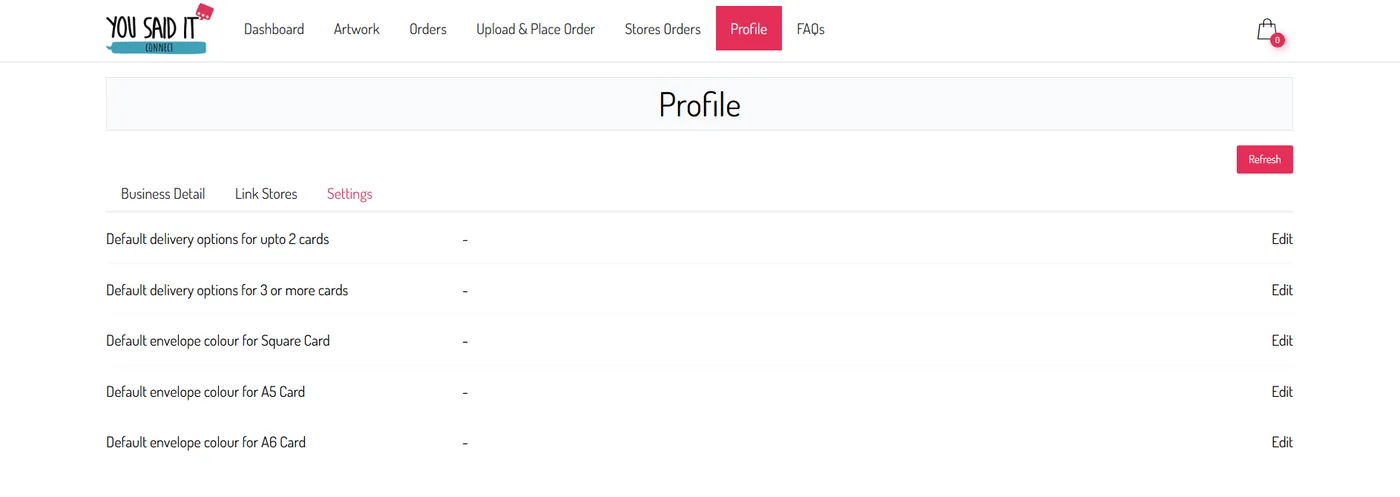
From your Connect dashboard, open Profile and select the Settings tab.
Choose the default to change
Click Edit beside the delivery or envelope setting you want to update.
Square, A5 and A6 can have different default envelope colours.
Select your preferred option
Choose the envelope colour or delivery service you normally use, then click Save.

Check the saved default
The next time you place an order or import one from a store, Connect will automatically select the saved option.
Defaults save time, but individual orders can still be changed before printing.
Helpful tips
Defaults work best when they reflect the majority of your orders.
A default can be changed on an individual order.
Change defaults when your packaging or delivery offer changes.
Do not assume one envelope default covers every format.
You’re ready
Before moving on, check that each of these is complete.